What is a Definition of Done checklist?
Definition of Done is the quality bar every story should clear before someone moves it to Done. In Jira, a checklist turns that bar into tickable steps on the work item itself: peer review complete, CI green, docs updated, and so on. The list is the same for every story; only the ticks change.
A Definition of Done checklist enforces clarity and removes ambiguity before someone moves work to Done. Instead of asking “Is it already done?”, “Did we follow the same standards as last time?”, or “What is our quality bar for this story?”, the team points at the list on the issue. Everyone sees the same steps, ticks the same evidence, and agrees what “finished” means.
The gap shows up in everyday language. One team says a story is done when development, testing, and code review are complete — but does that mean deployed? Another team means done only after the change has passed the full delivery lifecycle and is live in production. A Definition of Done checklist forces that conversation once, writes the answer on the issue, and stops every story from re-opening the same debate.
Why teams keep Definition of Done on the issue
Most teams already know what “good” looks like. The friction is repeating it. Without a shared list, “done” becomes a debate in stand-up, review comments live in three places, and the next person inherits an incomplete handoff. A checklist on the issue makes the bar explicit: everyone sees the same steps, progress is visible on the board, and nothing critical hides in someone’s head.
In software delivery, the payoff shows up on every story: you open the ticket, see what is left — review merged, tests green, docs updated — tick as you go, and move to Done only when the evidence is on the issue. The same bar applies whether you are shipping a feature, fixing a bug, or cleaning up tech debt.
When to apply it
Use a Definition of Done checklist on every story, bug fix, or task that should leave the same quality behind. Apply it when work moves to In Progress or when the story is created, so the bar is there from the start. Require it before the Done transition when Done should mean the bar is met.
Definition of Done vs acceptance criteria vs ready
Acceptance criteria describe this work item’s promised behavior — the examples you will demo. Definition of Ready asks whether the item is clear enough to pull into the sprint. Definition of Done is the shared exit bar: tests, review, documentation, and release readiness that every story owes the next person. Teams that keep all three as checklists on the issue see the difference instead of arguing about it in stand-up.
Definition of Done — an example to start with
If you don't have a Definition of Done checklist, start with the example below. Copy the list and paste it into the Checklist for Jira input field on a work item. Ideally, save it as a template and apply it to every story — that cuts down manual work each time someone starts a ticket. Adjust the headings for your stack; keep the list on the work item so progress stays visible.
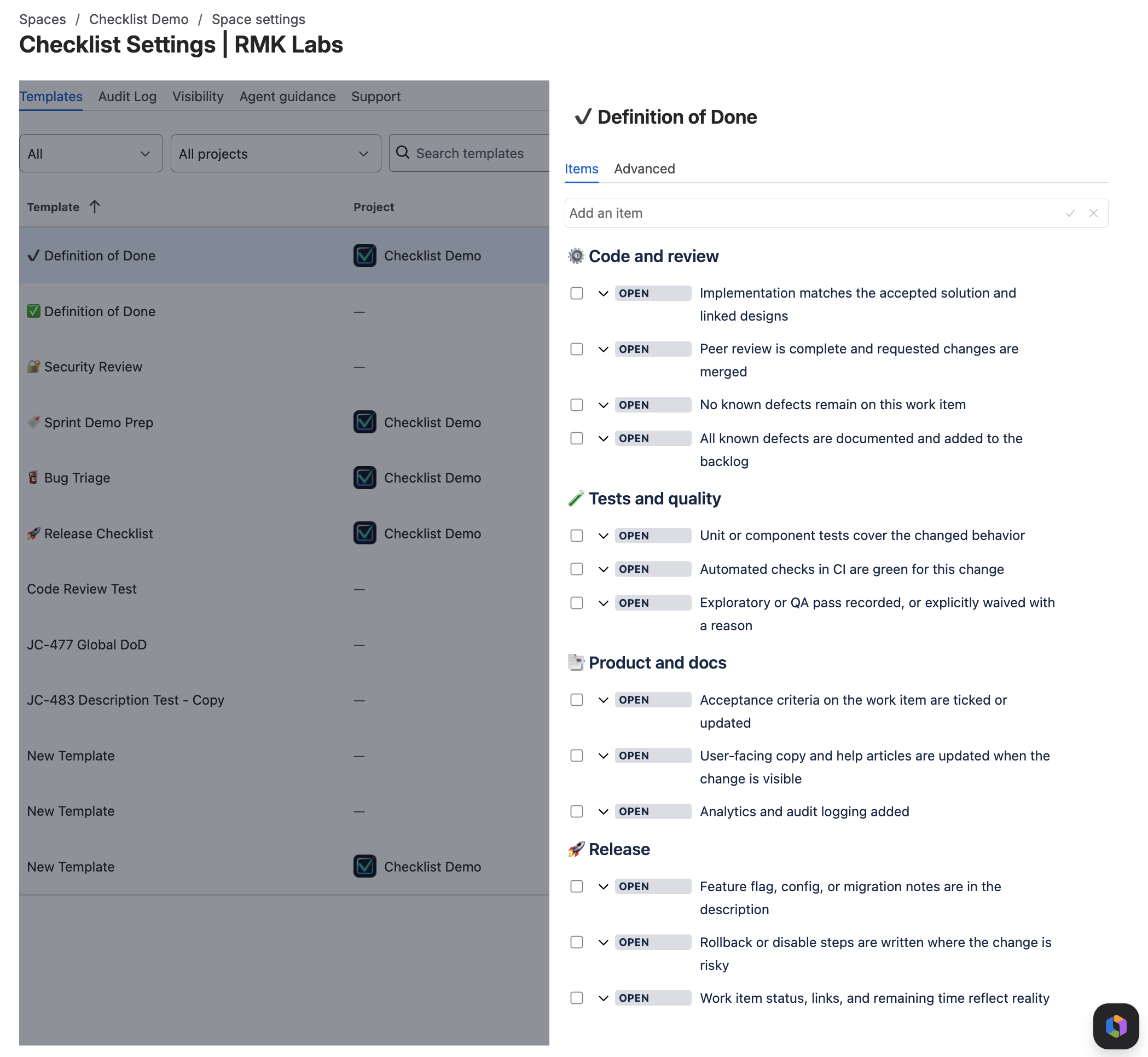
Definition of Done
- Code and review
- Implementation matches the accepted solution and linked designs
- Peer review is complete and requested changes are merged
- No known defects remain on this work item
- All known defects are documented and added to the backlog
- Tests and quality
- Unit or component tests cover the changed behavior
- Automated checks in CI are green for this change
- Exploratory or QA pass recorded, or explicitly waived with a reason
- Product and docs
- Acceptance criteria on the work item are ticked or updated
- User-facing copy and help articles are updated when the change is visible
- Analytics and audit logging added
- Release
- Feature flag, config, or migration notes are in the description
- Rollback or disable steps are written where the change is risky
- Work item status, links, and remaining time reflect reality
Put this on the work item with Checklist for Jira
Templates, automation, workflow gates, and a Rovo agent — free for teams of up to 10 users.
Save, protect, automate, require
Turn the example into a standard your team runs on every story, task, and bug. Four steps in Checklist for Jira: save the template, protect the structure, auto-apply it with built-in automation, then require completion before Done.
Save
Create a project template in that project’s Checklist settings, or a global template in Jira administration, and paste in the list from the example above. Adjust the items for your stack and add a short description so teammates — and the Rovo agent — know when to use it. A saved template is how you reuse the same Definition of Done on every story without re-entering it, and it unlocks auto-apply and workflow validators in the steps below.
Protect
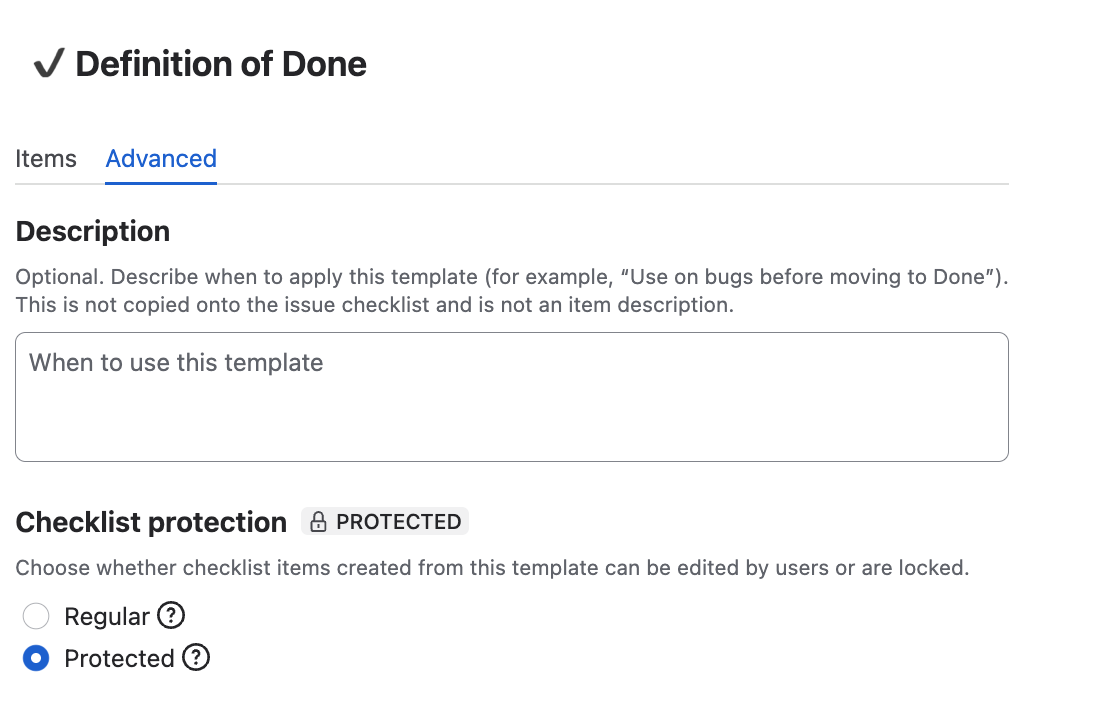
Mark the template Protected on the Advanced tab. People can tick items and change item statuses on the issue, while the step list stays locked — the Definition of Done stays the same on every work item the template touches.
Automate
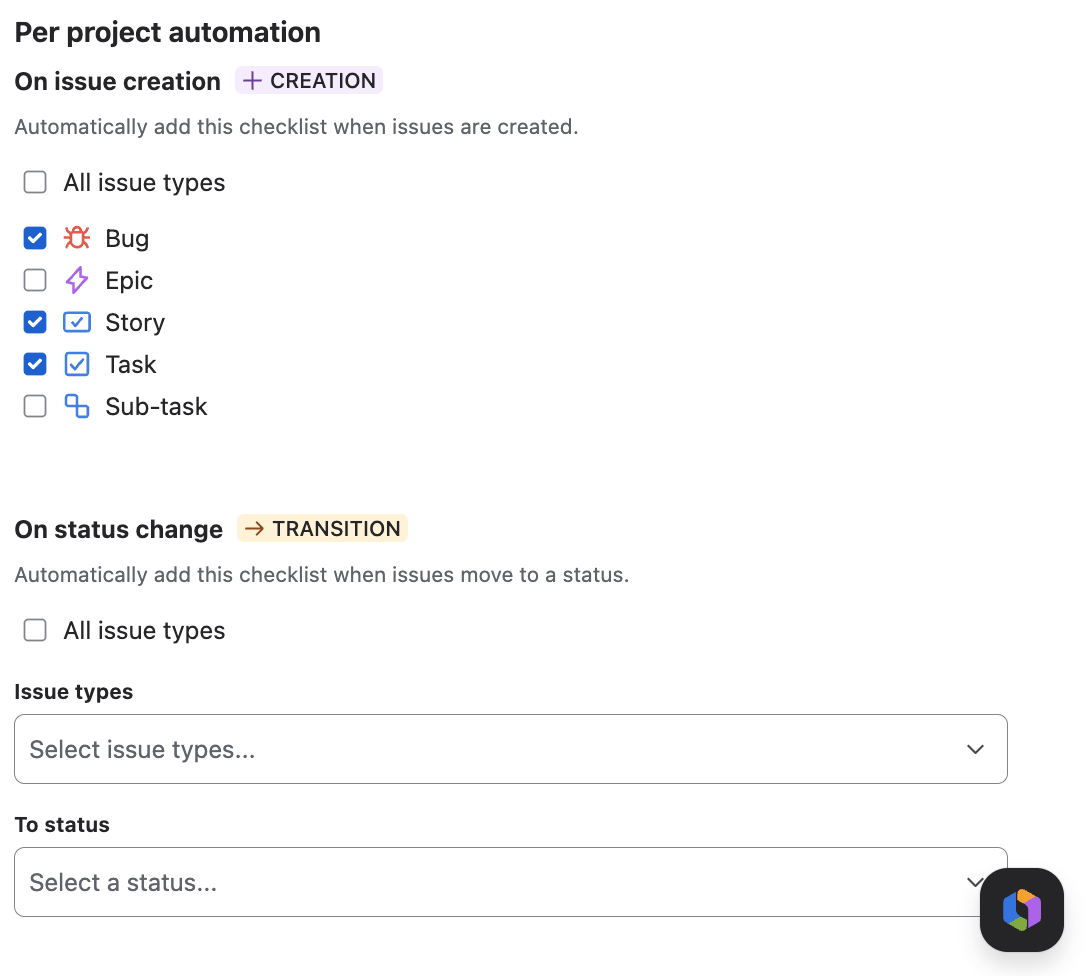
Use the app’s built-in per-template automation to attach this Definition of Done when selected issue types are created or when work moves to a status you choose. Tick Story, Task, and Bug (or whichever types should carry the same bar) so the list is on the issue before anyone starts ticking. The good news: these automations are built into Checklist for Jira and run without Jira Automation credits.
Require
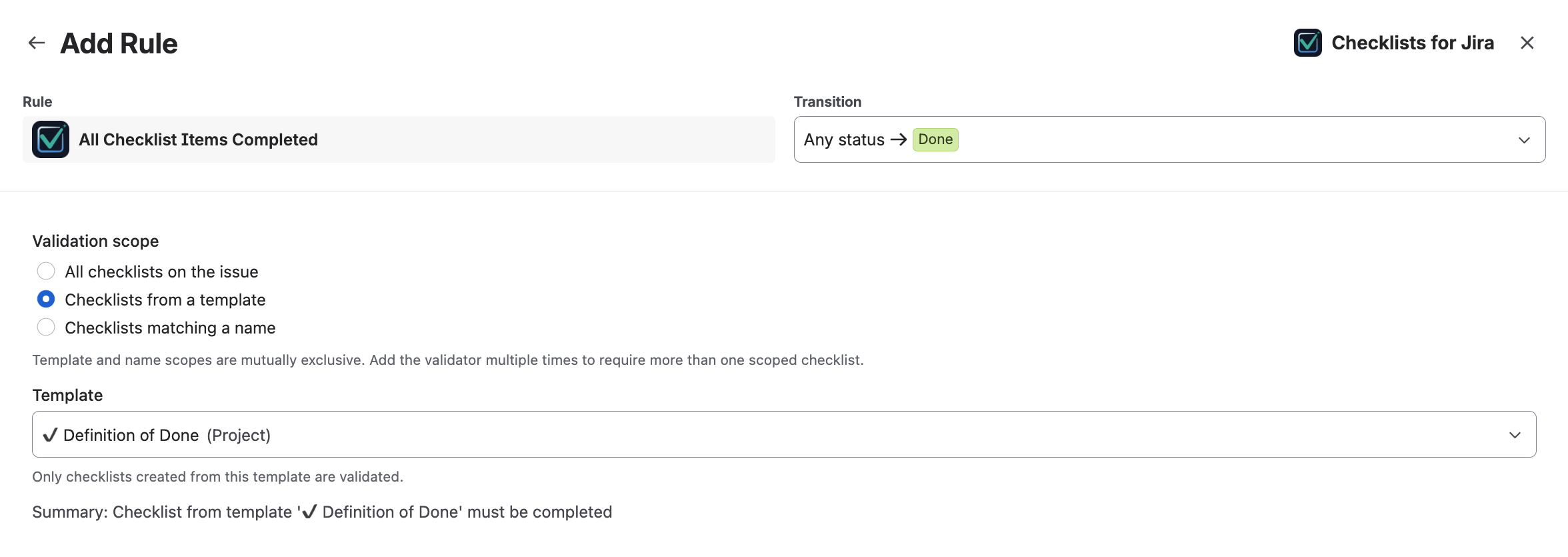
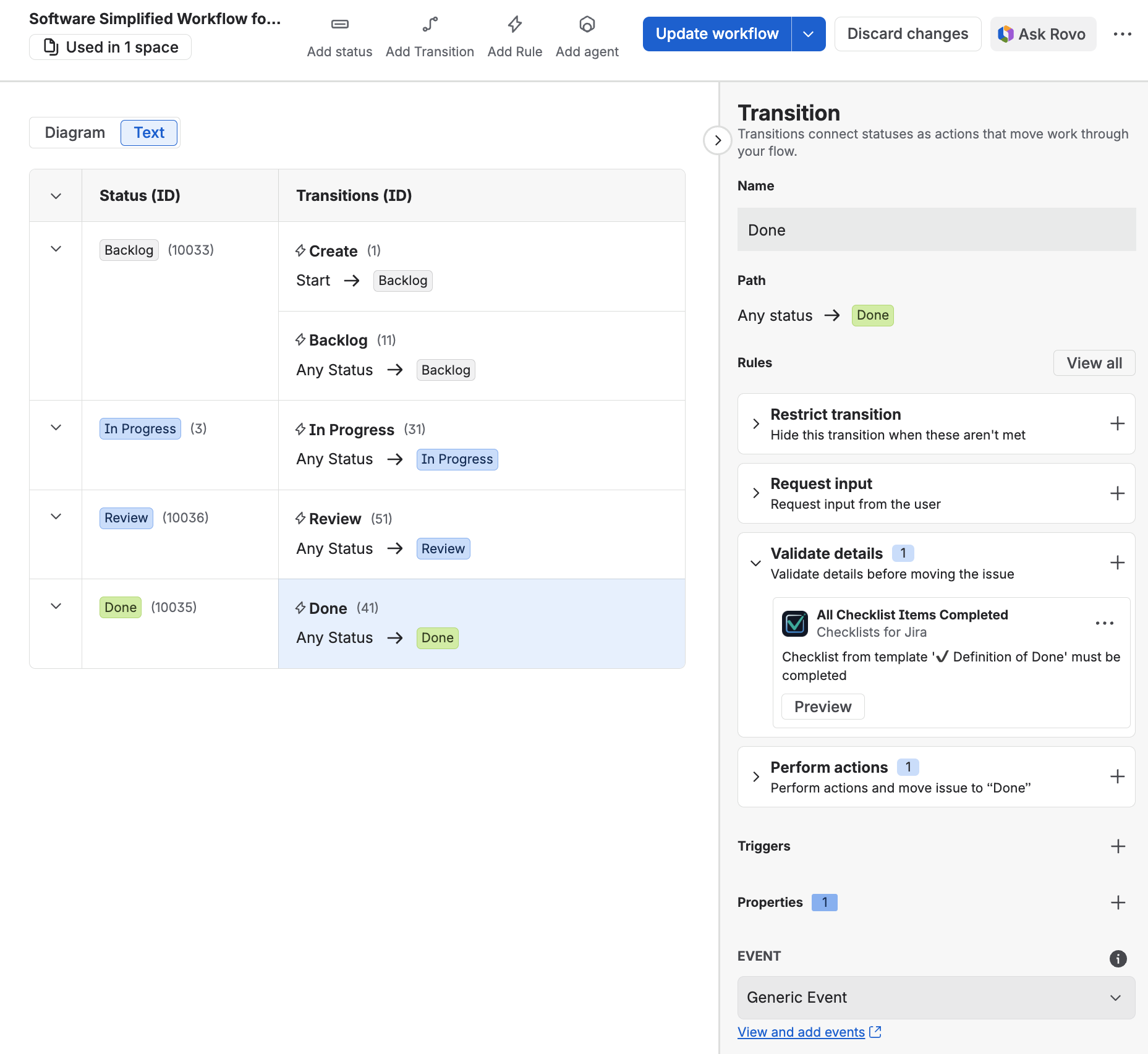
Add a completion validator on the Done transition in your Jira workflow. Scope it to this template from the template list so the transition waits until every item is complete — the work item stays open until the checklist is finished. The automation guide walks through validators, post functions, and harder cross-project rules.
Pair it with the rest of the delivery set
Keep acceptance criteria on the same issue for the example. Attach the QA testing checklist when the issue type is Bug or when QA owns a dedicated pass. Use the release checklist on the change that actually ships. Browse the template hub for the full set.
FAQ
Should Definition of Done live in Confluence instead?
Keep the policy page in Confluence if you like a long explanation. The working list belongs on the Jira work item so people tick it where the work happens.
Can we have more than one Definition of Done?
Yes. Save a lighter template for bugs and a fuller one for features, then auto-apply by issue type or status.
Put this on the work item with Checklist for Jira
Templates, automation, workflow gates, and a Rovo agent — free for teams of up to 10 users.