What is a Jira checklist template?
A template is how you describe a standard process — whether that is Definition of Done, a QA pass, a release runbook, or intake checks your team runs the same way — and reuse the same items on stories, bugs, tasks, IT tickets, and more. With Checklist for Jira, you save those items once and your team can apply them on every work item that needs the same standard.
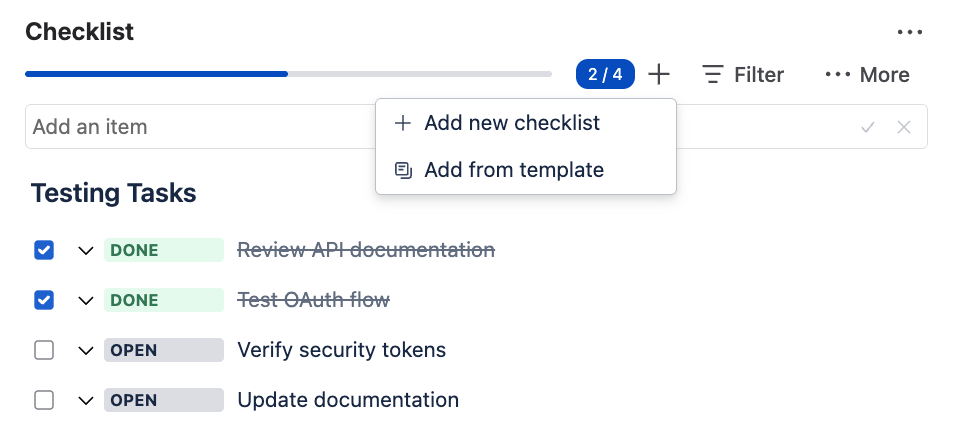
Apply a template from the issue page
It takes a few clicks to apply a template to an issue. Just open a story, bug, task, or ticket and follow the steps.
- In the Checklist panel, click Add (+).
- Choose Add from template.
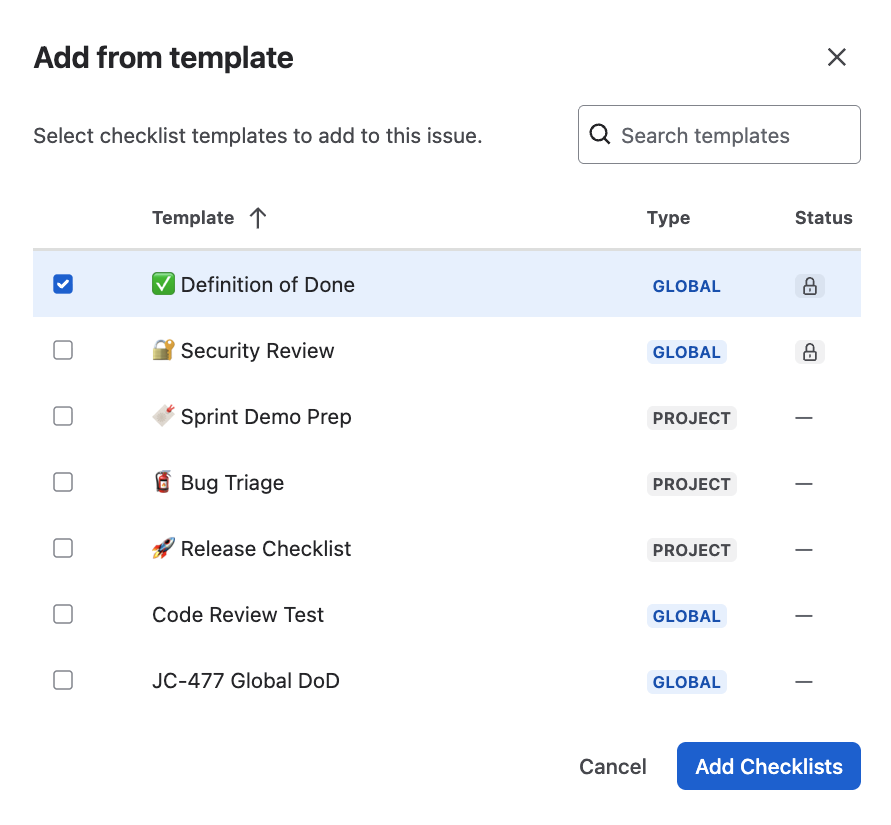
- Select a template from the list of previously saved templates.
- Click Add — done. Tick items as you work through the steps.
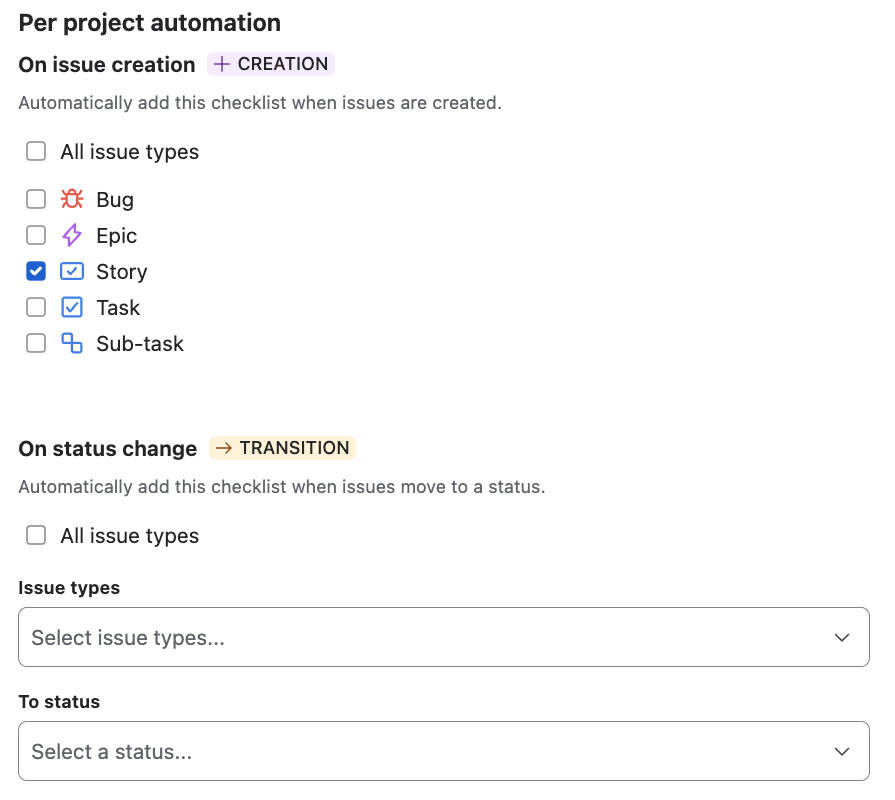
Project and Jira admins can turn on auto-apply templates on issue create or when a status changes. This is built into the app, so no automation credits are required.
Put this on the work item with Checklist for Jira
Templates, automation, workflow gates, and a Rovo agent — free for teams of up to 10 users.
Software delivery templates
These five lists cover the path from backlog to production. Each page distinguishes the job: Definition of Ready is intake quality, Acceptance Criteria are the example’s promised behavior, Definition of Done is the team’s ship bar, QA Testing is the test pass, and Release is the launch runbook.
| Template | Who it helps | Use it when |
|---|---|---|
| Definition of Done | Developers, reviewers, Scrum Masters | Every story should leave the same quality bar behind. |
| Acceptance Criteria | Product owners, developers, testers | The work item needs examples of done behavior, not a process sermon. |
| Definition of Ready | Product owners, analysts, team leads | You want clearer intake without treating Ready as a Scrum law. |
| QA Testing | QA engineers, developers | Bugs and stories need a repeatable test pass on the same issue. |
| Release | Release managers, DevOps, leads | A change is heading to production and the runbook should travel with it. |
IT and operations
The same pattern works for access reviews, change windows, and incident follow-up: keep the steps on the work item, save the list as a template, and require completion before the status that means “closed.” We have not published those routes yet, so this hub does not link them. Start from Release or QA Testing and rewrite the headings for your runbook.
Business process
Onboarding, vendor onboarding, and finance close all benefit from a Protected template so the sequence cannot drift. An onboarding template is a natural next page; it is not published here yet, so you will not find a broken link. Start from the Definition of Ready page — context, owner, and “ready to start” — then save your version in the app.
Financial, security, and other audits
SOC 2, ISO, financial close reviews, and access certifications all run on the same checklist: evidence gathered, controls tested, findings logged. Save the audit steps and expected deliverables as a Protected template, apply it to each audit work item, and every tick leaves a timestamp on the issue. Auditors and compliance leads get a repeatable process with a clear trail — who completed what, and when — without spreadsheets chasing the ticket.
How to save a template in Checklist for Jira
- Install Checklist for Jira from the Atlassian Marketplace and open any Jira work item.
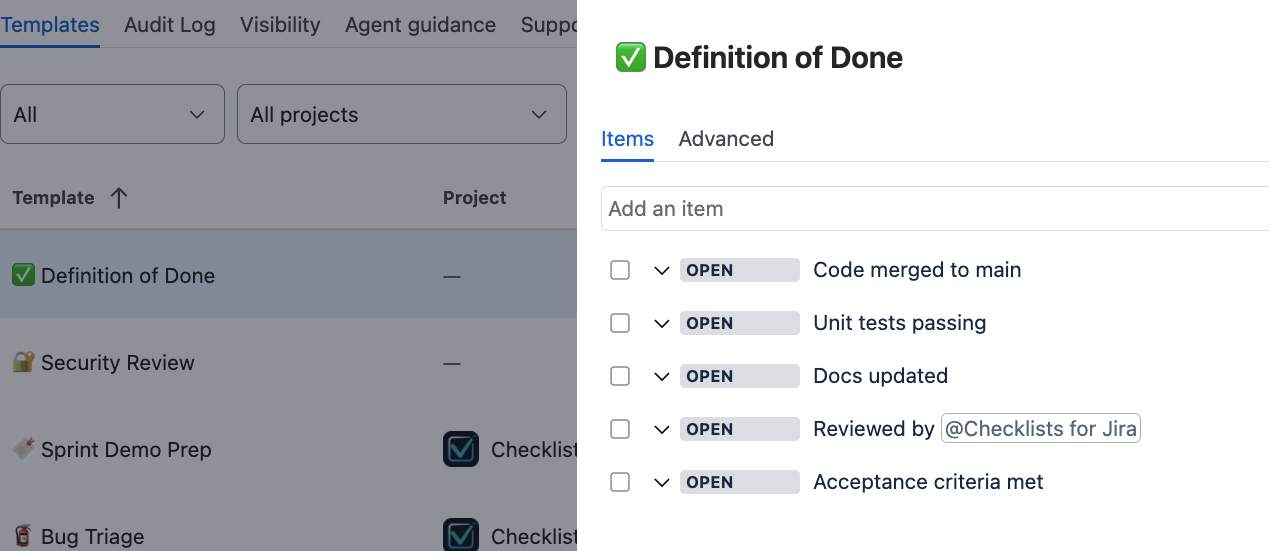
- Build the list in the checklist panel, or start from an existing template and adjust the items.
- Save it as a project template (project admin) or a global template (Jira admin).
- Add a short description — this will help people and the Rovo AI agent know when to use it.
- (Optional) Turn on built-in auto-add in template settings (see auto-apply templates below), or wire rules through Jira Automation.
Auto-apply templates
Each template can carry per-project automation: add the checklist when selected issue types are created, or when work moves to a status you pick. It runs inside Checklist for Jira, so the everyday cases do not spend Jira Automation credits.
Validators, reset-on-reopen, and cross-project rules still belong in Jira Automation. The in-depth automation guide walks through those patterns in more detail; the product docs cover the full product surface.
FAQ
Do I need Checklist for Jira to use these templates?
Yes. You need an app because this functionality is not built into Jira. Install Checklist for Jira from the Atlassian Marketplace and save each list as a project or global template. Then you and the users of your Jira will be able to apply it on work items, automate it, and require completion before a transition.
What is the difference between project and global templates?
Project templates are saved by project administrators and are available within that project. Global templates are saved by Jira administrators and can be applied on work items across any project.
Can I mix templates on one work item?
Yes. Checklist for Jira supports multiple checklists on one issue — for example Definition of Done plus a QA pass on a bug.
Put this on the work item with Checklist for Jira
Templates, automation, workflow gates, and a Rovo agent — free for teams of up to 10 users.